Email / SMTP
Configures the SMTP server KPImailer sends every report and alert through, plus the retry behavior and debugging tools around delivery.
-
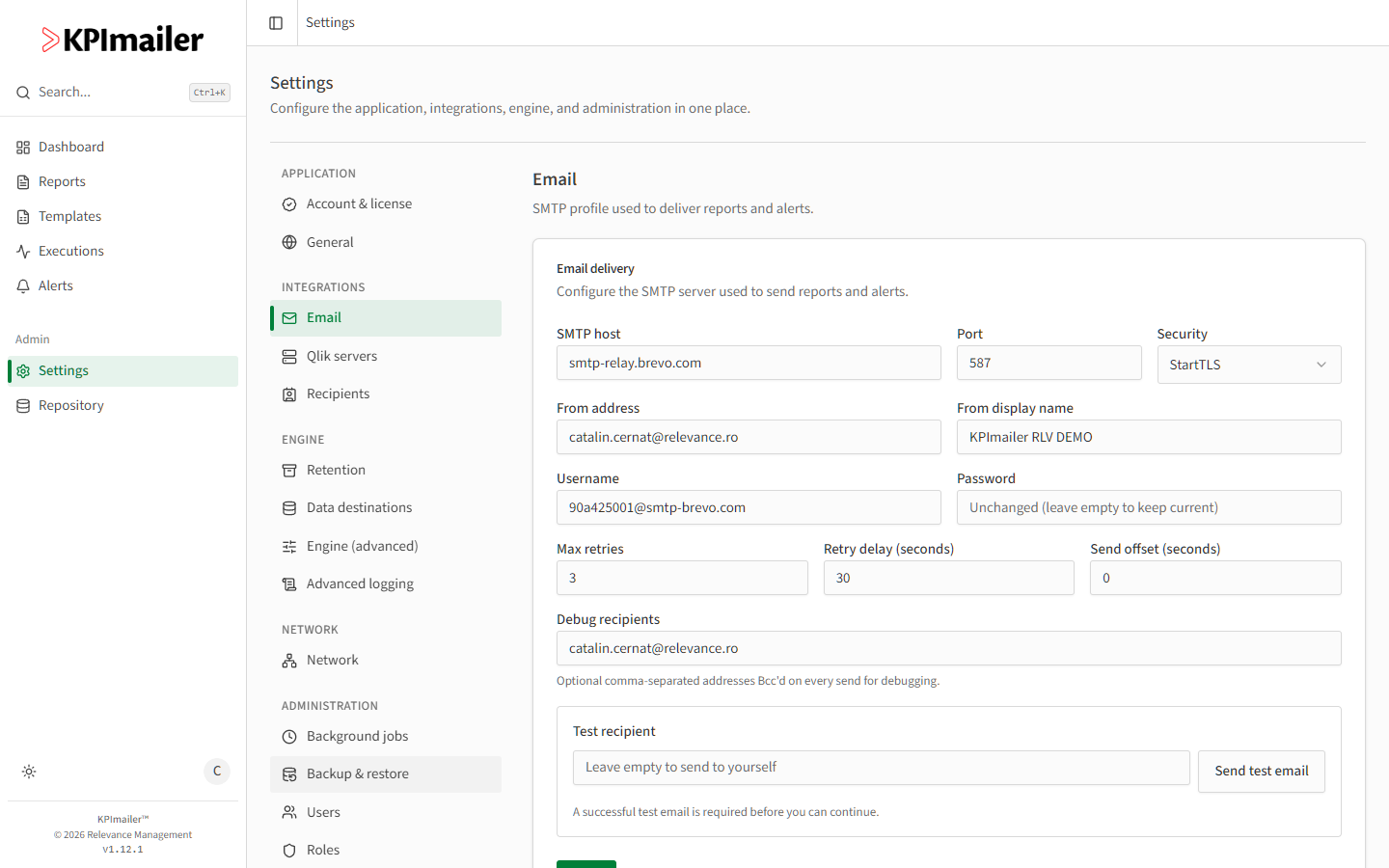
Open Settings → Email.
-
Fill in the connection: SMTP host, Port, Security (StartTLS or similar), From address, From display name, and the Username / Password your mail provider requires.
-
Tune delivery behavior:
- Max retries - how many times KPImailer retries a send that fails.
- Retry delay (seconds) - how long it waits between retries.
- Send offset (seconds) - a delay applied before sending, useful for spacing out a burst of emails.
-
Set Debug recipients - a comma-separated list of addresses Bcc’d on every report and alert KPImailer sends. Leave it on while you’re actively configuring or troubleshooting reports.
-
Use Send test email to confirm delivery end to end. A successful test is required before you can save and move on.
-
Select Save.
When to change this
Section titled “When to change this”- Switching mail providers or rotating SMTP credentials - update host, username, and password together, then re-test.
- Reports failing or arriving late - check Max retries and Retry delay first; a flaky mail server may need more retries with a longer delay.
- Large recipient bursts - a Send offset spaces out a cycle/burst report’s many individual emails, which can help with mail providers that rate-limit bursts of sends from one account.
- Investigating what a report actually sent - add yourself to Debug recipients temporarily rather than guessing from the recipient list alone.
Worked example
Section titled “Worked example”Reports occasionally fail to send during a provider’s brief maintenance windows. An administrator raises Max retries from 3 to 5 and Retry delay from 30 to 60 seconds, saves, and sends a Send test email to confirm the connection still works - now a short provider hiccup is absorbed by retries instead of failing the report outright.
What can go wrong
Section titled “What can go wrong”A Password field showing placeholder text means the stored password is unchanged - leave it empty to keep the current credential, and only fill it in when you’re actually rotating the password.